



Arduinobot
 B
B✓ Links verified May 19, 2026
Guides and BOM only — orobot firmware does not yet support this hardware.
Sign up to ExploreAbout this program
89 stars on GitHub.
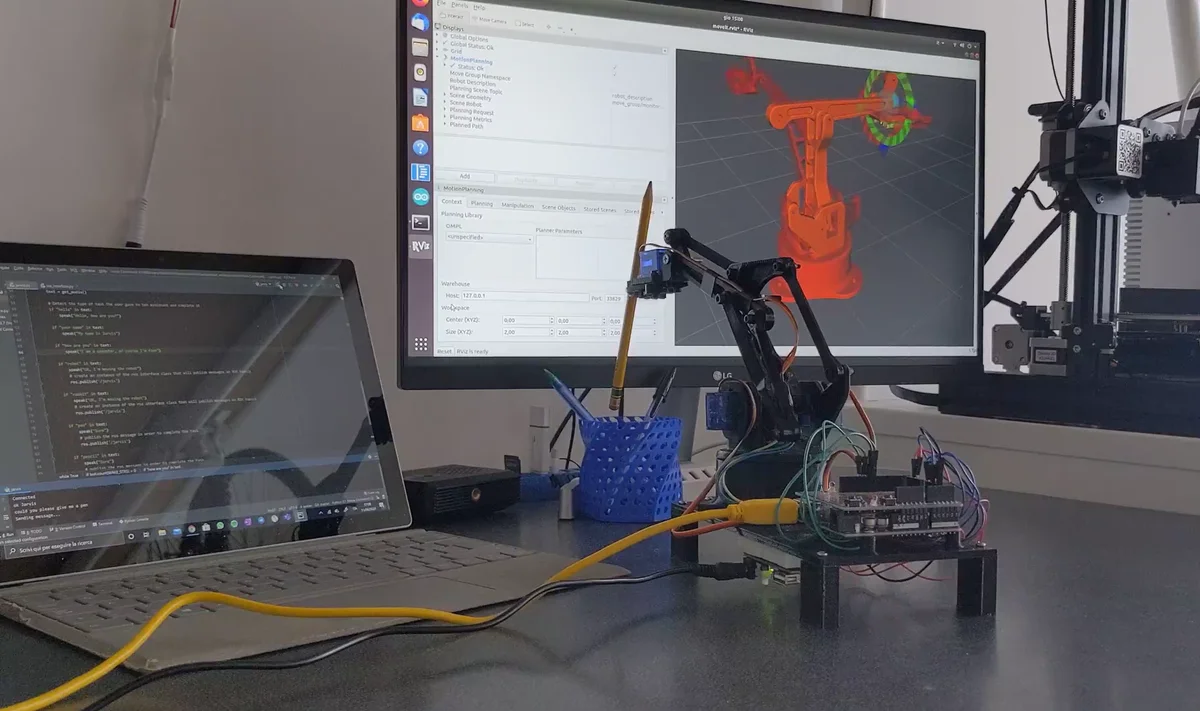
Arduinobot is an open-source 3D-printed robot arm powered by ROS 2, designed as an accessible learning platform for robotics and manipulation. Created by Antonio Brandi, it is the companion hardware to the "Robotics and ROS 2 - Learn by Doing! Manipulators" online course.
Source: https://github.com/AntoBrandi/Arduino-Bot
The arm is built entirely from 14 3D-printable parts: a basement and base plate forming the base structure, a vertical drive arm and forward drive arm for the main two links, a horizontal arm for the third joint, a link and triangular link for intermediate connections, a round plate and servo plate for the wrist assembly, a pi_camera mount for adding a Raspberry Pi camera, and a parallel claw gripper with left finger, right finger, and claw support.
Control uses Arduino for low-level servo actuation via an Arduino firmware script (robot_control.ino), while ROS 2 handles high-level planning, motion execution, and simulation. A full Gazebo simulation environment mirrors the physical robot, enabling development and testing without hardware. The accompanying course covers URDF modeling, MoveIt2 motion planning, custom control interfaces, pick-and-place tasks, and computer vision integration.
The design prioritizes simplicity and low cost, making it practical for students learning the full robotics stack from hardware assembly through ROS 2 programming.
License: Apache 2.0.
🖨 Print Files (42)
base_plate.STL
basement.STL
claw_support.STL
forward_drive_arm.STL
horizontal_arm.STL
left_finger.STL
link.STL
pi_camera.STL
plate.STL
right_finger.STL
round_plate.STL
servo_plate.STL
Required Hardware
| Qty | Part | Notes |
|---|---|---|
| 1 | :rocket: arduinobot_bringup: Contains launch files that starts all the functionalities of the real or simulated robot. | — |
| 1 | :video_game: arduinobot_controller: Contains the ROS 2 Control configuration and Hardware interface with the real robot. | — |
| 1 | :paperclip: arduinobot_cpp_examples: Contains ROS 2 templates for developing with C++. | — |
| 1 | :ledger: arduinobot_description: Contains the URDF description of the robot and its Gazebo simulation. | — |
| 1 | :battery: arduinobot_firmware: Contains the Arduino code for actuating the motors of the real robot. | — |
| 1 | :brain: arduinobot_moveit: Contains the MoveIt 2 configuration and launch files. | — |
| 1 | :email: arduinobot_msgs: Contains the definition of new ROS 2 message interfaces. | — |
| 1 | :paperclip: arduinobot_py_examples: Contains ROS 2 templates for developing with Python. | — |
| 1 | :speaking_head: arduinobot_remote: Contains the remote interface to move the robot using the Amazon Alexa voice assistant. | — |
| 1 | :hammer_and_pick: arduinobot_utils: Contains some utilities and tools. | — |
| 1 | Install VS Code and Arduino IDE on your PC in order to build and load the Arduino code on the device | — |
| 1 | Arduino 3D-Printed Robotic Arm | — |
Explore similar robots