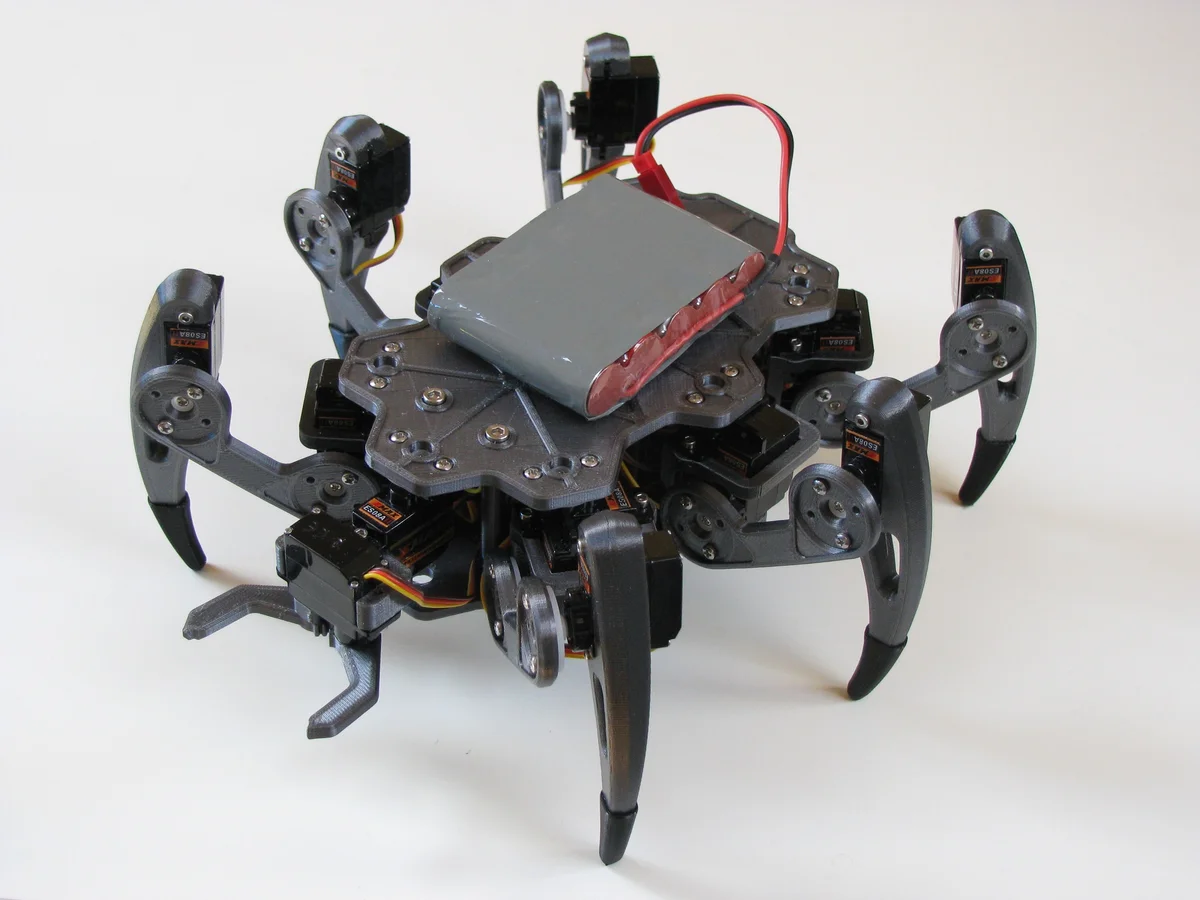
ZeroBug Hexapod
 B
B✓ Links verified Aug 31, 2026
Sign up to InstallAbout this program
ZeroBug is a 3D-printed micro-servo hexapod from Maximilian Kern (CoretechR), designed as a compact, low-cost teaching platform for inverse kinematics, gait generation, and embedded locomotion control. Eighteen SG90-class hobby servos (three per leg) give the robot the full coxa-femur-tibia kinematic chain needed for smooth, 3D body pose control — the same degree-of-freedom layout used by commercial research hexapods at a fraction of the cost.
The control architecture is the interesting bit. A Raspberry Pi Zero acts as the high-level brain and user-interface host: it serves a web dashboard (joystick, keyboard, multitouch, Bluetooth gamepad inputs) and streams MJPEG video from the Pi camera. An STM32F103 ("Blue Pill") board handles the real-time dirty work — inverse kinematics for all 6 legs, tripod/wave gait generation, and the 18 servo PWM channels — because running those loops reliably on Linux is a losing battle. The Pi and STM32 communicate over UART with a simple framed protocol. This "dumb but real-time microcontroller + smart but latency-tolerant SBC" pattern is a great template for any Pi-based locomotion robot.
The included front 2-finger gripper makes ZeroBug unusual among hobby hexapods — most are pure walkers, but ZeroBug can actually pick up objects. This opens up simple mobile-manipulation demos: walk to a target, pose-align the body, grab, carry, release.
This program exposes cloud-side locomotion endpoints (directional walk with speed, yaw turn, full 6-DOF body pose, wave animation, gripper open/close, emergency stop) that relay to the Pi Zero's web backend over WebSocket, which in turn commands the STM32 over UART.
Credit to Maximilian Kern (CoretechR) — upstream repository at https://github.com/CoretechR/ZeroBug under GNU GPLv3. Full build log at coretecrobotics.de.
Printing
All 10 STL files match the upstream CoretechR/ZeroBug CAD Files/ set 1:1 — the list is already correct and complete. Note the print quantities, since the static Print-All set lists each file once:
- Per-leg parts (print x6 — once per leg):
Coxa.stl,femur.stl,Tibia.stl,Sock.stl. ZeroBug is a 6-leg hexapod with an identical coxa-femur-tibia-foot chain on every leg, so each of these is printed six times (18 leg segments + 6 feet total). - Body (print x1):
Body-Top.stlandBody-Bot.stlform the two-part central chassis that sandwiches the electronics. Spacer.stl(print x6+): servo-mount / joint spacer; print at least one per leg (six), more if you want spares — small part.- Front gripper (print x1 each):
gripper_body.stl, plus the mirrored jaw pairgripper_clawL.stl+gripper_clawR.stl(both required — they are left/right mirrors, not alternates). The gripper is optional if you only want a walker, but it is the feature that distinguishes ZeroBug from typical hobby hexapods.
No duplicates, simulation meshes, alternates, or assembly-reference blobs are present. Servos (18x MG90S-class), the Raspberry Pi Zero, STM32F103, camera, battery, and electronics are sourced from the BOM — not printed.
🖨 Print Files (10)
Body-Top.stl
Body-Bot.stl
Coxa.stl
femur.stl
Tibia.stl
Sock.stl
Spacer.stl
gripper_body.stl
gripper_clawL.stl
gripper_clawR.stl
Required Hardware
| Item | Qty | Unit Cost | Notes |
|---|---|---|---|
| Raspberry Pi Zero W (or 2W) | 1 | $20.00 | High-level controller, video streaming |
| STM32F103 "Blue Pill" board | 1 | $5.00 | Servo PWM controller |
| MG90S micro servo (metal gear) | 18 | $5.00 | (inferred) 6 legs × 3 DOF |
| Raspberry Pi Camera Module v2 | 1 | $25.00 | (inferred) Front-mounted vision |
| 2S 7.4V LiPo battery 1500mAh | 1 | $18.00 | (inferred) Onboard power |
| 5V buck converter (5A) | 1 | $8.00 | (inferred) Servo and Pi rail |
| Custom PCB / perfboard | 1 | $10.00 | (inferred) Carrier for STM32 + power |
| RPi camera ribbon cable (Zero variant) | 1 | $4.00 | (inferred) Required for Pi Zero camera |
| MicroSD card 16GB | 1 | $7.00 | (inferred) Pi OS storage |
| Servo extension wires 3-pin 15cm | 18 | $0.50 | (inferred) Leg wiring |
| M2 / M3 screw and nut kit | 1 | $12.00 | (inferred) Frame assembly |
| XT60 connector pair | 1 | $3.00 | (inferred) Battery interface |
Explore similar robots